CARE TASKS
A caregiver task checklist for every shift
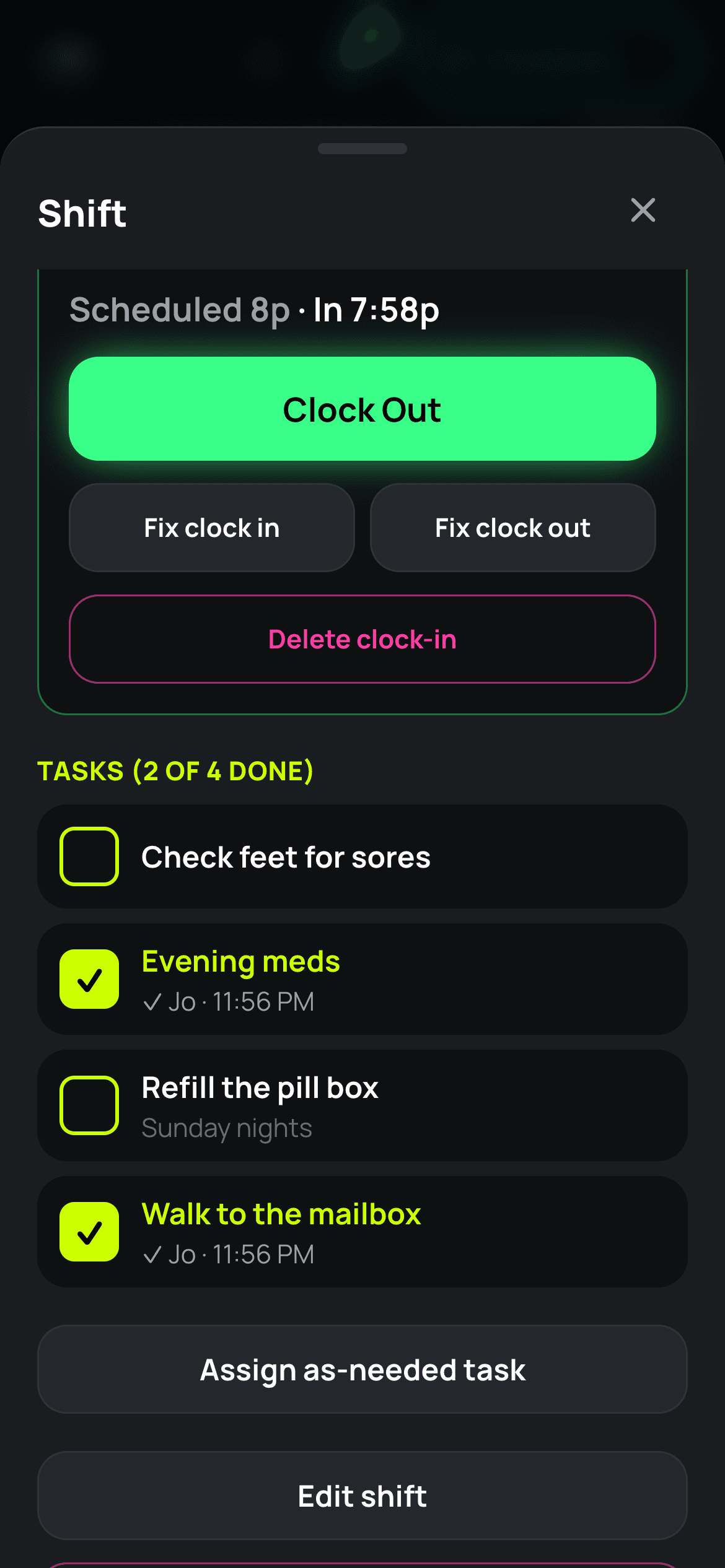
Evening meds. A walk to the mailbox. Check his feet. Refill the pill box on Sundays. Every care routine is a list of small jobs, and the hard part is making sure each one happens on every shift, no matter who's working.
Shark Team turns that routine into a checklist attached to each shift. Caregivers check things off as they go, the family sees what's done, and a reminder goes out before the shift ends if anything is still open.
Build the checklist once
Add each task with a short title and an optional note, like “Lisinopril and Metformin” or “If he feels up to it.” Then choose when it applies:
- Every shift, for the things that happen every time.
- Some days, like refilling the pill box on Sundays or laundry on Mondays and Thursdays.
- One date, for a one-time job like picking up a new prescription.
- As-needed tasks that are added to a shift only when they're needed.
Check off tasks during the shift
When a caregiver opens their shift, the day's tasks are right there. Each check-off shows who did it and when, so there's never a question about whether the evening meds were done. Tasks can be checked off even with no signal and are sent when the phone reconnects.
Keep task titles short and clear, in the words your family uses, and put the details in the note. “Evening meds” with a note listing which ones is easier to scan than a long sentence.
The family can open the shift any time to see the progress, like “2 of 4 done,” without calling the caregiver.
- Each check-off shows who and when
- Works with no signal
- Family can see progress any time
Task reminders before the shift ends
If tasks are still open 30 minutes before a shift ends, the caregiver on that shift gets a reminder, and the Account Holder and Admins see which tasks are still open. It's a gentle nudge while there's still time, not a scolding after the fact.
If a caregiver tries to clock out with tasks still open, Shark Team shows them what's left and lets the Account Holder and Admins know. Only shifts that were on the schedule ahead of time send these alerts.
- A reminder 30 minutes before the shift ends
- Unfinished tasks flagged at clock-out
- Only for shifts scheduled ahead of time
Hand off what's left
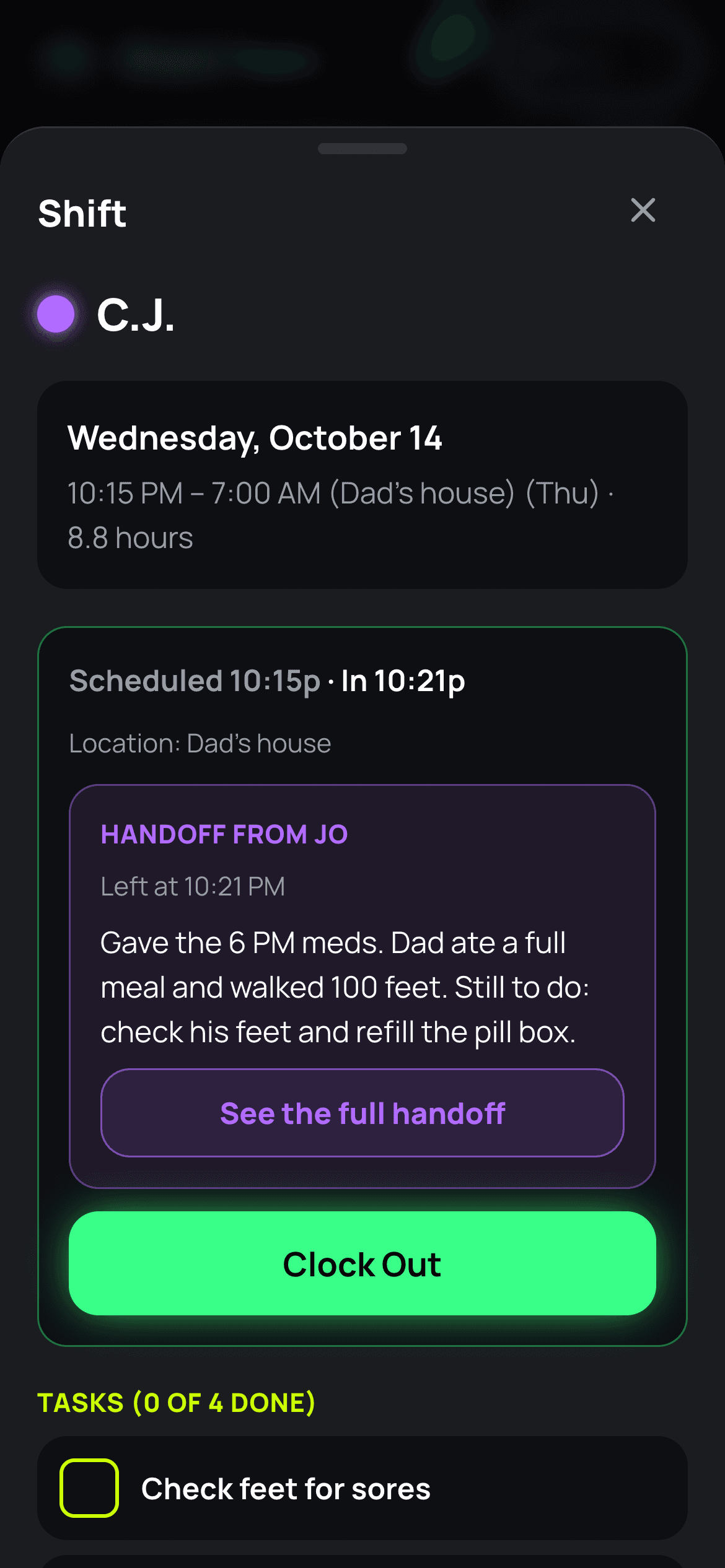
Some things don't get finished, and that's fine as long as the next person knows. The caregiver's handoff note tells the next shift what's still to do. See our caregiver daily task checklist for ideas on what to include in your own routine, with a free printable version.
Who uses care task checklists
Families with hired caregivers
Everyone follows the same routine, and you can see it's done.
Families splitting shifts
No more “I thought you did it” between siblings.
New caregivers
The checklist teaches the routine from day one.
Care at more than one place
Each patient has their own tasks and their own team.
Private by design
Each patient's information is shared only with the people you invite, and each role sees only what it should. We never sell your data, there are no ads, and there's no tracking. Lock-screen notifications never show readings or message text. Read our privacy policy.
Not medical advice
Shark Team helps you keep good records and share them. It doesn't give medical advice, diagnose anything or replace your doctor, nurse or pharmacist. In an emergency, call 911.
Care tasks questions
Is it free?
Early access is free.
Do I need the schedule to use tasks?
Yes. Tasks belong to shifts, so turn on Schedule and Tasks together. If you don't use shifts, a shared note or message can work as a simple to-do list.
Who gets the reminder 30 minutes before the shift ends?
The person on that shift gets “You have tasks still open,” and the Account Holder and Admins see which tasks are open. Each person gets one copy.
Can a task happen only on certain days?
Yes. Choose “Some days” and pick the days of the week, or “One date” for a one-time task.
Can tasks be checked off without a signal?
Yes. Check-offs are saved on the phone and sent automatically when the signal comes back.
Get your family's care on the same page.
Early access is free. We'll set you up personally.